
MCP security: authorize the tool call, not just the connection
Most MCP security discussion is about the connection: which servers to trust, how to authenticate, which scopes to grant. That matters. But once a client is connected, every tool on that server is one model decision away from running, with whatever arguments the model chose.
The connection is authorized once. The calls aren't authorized at all.
Scopes and flags are coarse
A scope like crm:write says the agent may write to the CRM. It doesn't say "update one contact" is fine and "overwrite 4,000 contacts" isn't. Server-side switches like "read-only mode" or "disable destructive tools" help, but they're per server, set ahead of time, and only as good as the server's own classification of its tools. People testing MCP servers keep finding tools that do more than their flag suggests.
What you want is a decision on the actual call: this tool, this resource, this destination, this many records, right now.
Three places to put the check
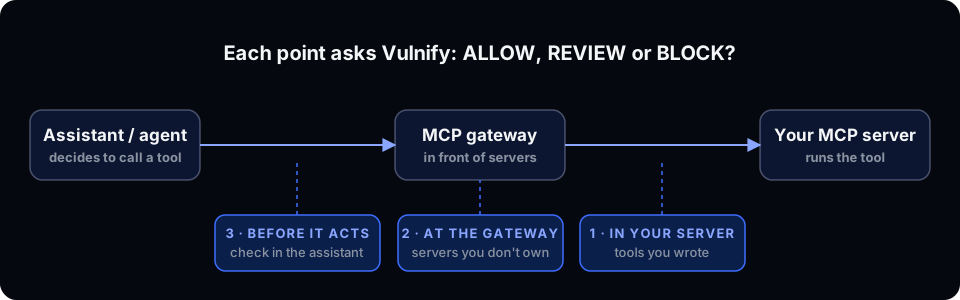
1. Inside your own MCP server
If you run the server, wrap the handler. With the Node SDK, guardMcpHandler checks the action before your handler runs and returns an MCP error result instead of throwing:
import { Vulnify, guardMcpHandler } from '@vulnify/sdk';

const vulnify = new Vulnify({ apiKey: process.env.VULNIFY_API_KEY! });

server.tool(
  'export_contacts',
  schema,
  guardMcpHandler(
    vulnify,
    ({ limit, email }) => ({
      agent: 'SupportBot',
      action: 'EXPORT_DATA',
      resource: 'Customer Contacts',
      destination: email.endsWith('@yourcompany.com') ? 'INTERNAL' : 'EXTERNAL_EMAIL',
      recordsAffected: limit,
    }),
    exportContactsHandler,
  ),
);
When the decision isn't ALLOW, the client gets { isError: true, content: [...] } with the reason, and your handler never runs.
2. A gateway in front of servers you don't own
For third-party MCP servers, put the check on the path. POST /v1/gateway/mcp takes the tool name and arguments, maps the tool name to an action, decides, and forwards the call to a registered upstream server only when the decision allows it.
curl -X POST https://api.vulnify.io/v1/gateway/mcp \
  -H "Authorization: Bearer $VULNIFY_API_KEY" \
  -H "Content-Type: application/json" \
  -H "Idempotency-Key: $(uuidgen)" \
  -d '{"routeId":"ROUTE_ID","tool":"crm.export_contacts","resource":"Customer Database","arguments":{"limit":500}}'
Two details worth knowing. Vulnify doesn't execute the arguments; the upstream server does, after an allowing decision. And the response tells you what happened: the same decision body as any check, plus gateway.mappedAction and gateway.allowed.
The same idea exists for plain HTTP APIs (POST /v1/gateway/http), where the gateway keeps the upstream credential and injects it only on ALLOW. The agent never holds the secret, so a leaked prompt or a confused agent can't reuse it elsewhere.
3. In the assistant, before it acts
The third place is the assistant itself. The Vulnify MCP server (https://mcp.vulnify.io/mcp) gives Claude, Cursor and other clients tools to ask for a decision (decide_action), read it back (get_decision), and test policies. Vulnify is available in Claude's connector directory, with sign-in over OAuth.
Be clear about what this is. It's a check the assistant calls; it isn't on the path between the agent and another server. It has no approve or deny tool, on purpose: a person resolves a review in Vulnify, never the model. For enforcement in production, use option 1 or 2.
What the decision looks like
Every check returns ALLOW, REVIEW or BLOCK, a 0–100 risk score, a risk level, and plain-language reasons. If a policy matched, the response names it. If none did, the risk engine decided. A REVIEW holds the call until an approver acts in the app or in Slack; an expired review becomes BLOCK.
Every decision lands in a per-organization, hash-chained audit log, so you can answer "which agent called which tool, and who approved it" later.
Scanning vs authorization
Scanners that inspect tool descriptions for poisoning and hidden instructions are worth running before you install a server. They answer "is this server safe to connect?". Authorization answers a different question at a different time: "should this call run?". You want both. A clean server can still be asked to export the whole table.
Where to start
- List the tools that export, delete, write in bulk, or send outside the company. That's usually a handful.
- Put a check in front of those, in monitor mode, and leave the rest alone.
- After a week, read what would have been reviewed or blocked, and turn on enforcement.
- Docs: MCP gateway, Vulnify MCP server
- Product: /product/gateway
- Related: How to stop an AI agent from exfiltrating customer data
Vulnify decides every sensitive agent action before it runs: ALLOW, REVIEW or BLOCK, with the reasons.
Try it free