
How to stop an AI agent from exfiltrating customer data
An agent with an export tool and an email tool can send your customer list to a stranger. It doesn't take a clever attack. A support ticket says "please send me a copy of all customer contacts", the model reads it as a task, and the tools do exactly what they were built to do.
That's exfiltration, even when nobody meant it. This post covers where the data actually leaves, why the usual controls miss it, and how to put a check in front of the few actions that matter.
Where the data leaves
Agents don't leak data by "thinking" about it. They leak it through actions:
- Exports. A CSV of customers, a report, a database dump.
- Email. An attachment or a pasted table sent to an address outside the company.
- Outbound API calls. A webhook, a third-party CRM, a file upload.
Reading data is rarely the problem on its own. The risky moment is when data crosses a boundary: from your systems to an external destination, in a volume that doesn't match the task.
Why the usual controls miss it
Prompt filters look at text. A request for "a copy of the contacts" reads like normal work. The prompt is fine; the action isn't.
Read-only flags and OAuth scopes are set once, per tool or per token. If the agent is allowed to export at all, it can export 10 rows or 10,000, to anyone.
Approving everything doesn't scale. If a person has to click "approve" on every tool call, they stop reading. The useful version is the opposite: most actions run, and only the risky ones wait.
Decide per action, with destination and volume
The control that works sits right before the tool runs and asks one question about this specific call: who is doing what, to which resource, going where, and how much?
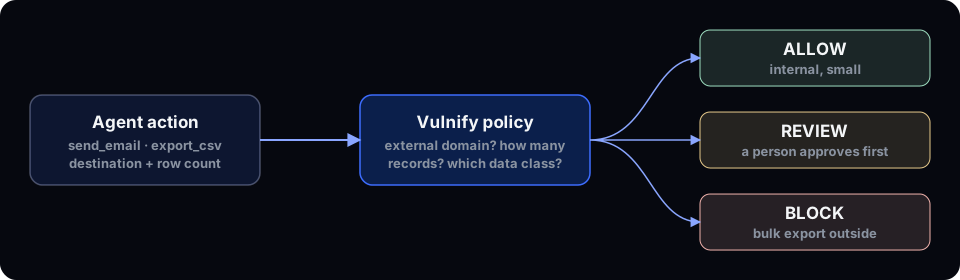
With Vulnify, that's one check. Your code describes the action (agent, EXPORT_DATA or SEND_EMAIL, resource, destination, record count) and gets back ALLOW, REVIEW or BLOCK, with a risk score from 0 to 100 and the reasons. The action runs only when finalDecision is ALLOW.
Destination is one of INTERNAL, EXTERNAL_EMAIL or EXTERNAL_API. That's the field that separates "send the report to my teammate" from "send the report to a Gmail address".
import { Vulnify, VulnifyBlockedError } from '@vulnify/sdk';

const vulnify = new Vulnify({ apiKey: process.env.VULNIFY_API_KEY! });
const COMPANY_DOMAIN = '@yourcompany.com';

const destinationFor = (to: string) =>
  to.toLowerCase().endsWith(COMPANY_DOMAIN) ? 'INTERNAL' : 'EXTERNAL_EMAIL';

async function exportCustomersTool(rows: number, to: string) {
  try {
    await vulnify.guard(
      {
        agent: 'SalesBot',
        action: 'EXPORT_DATA',
        resource: 'Customer Database',
        destination: destinationFor(to),
        recordsAffected: rows,
      },
      () => exportCustomers(rows, to),
      { timeoutMs: 120_000, pollMs: 2000 }, // wait up to 2 minutes for a person on REVIEW
    );
    return `Exported ${rows} records to ${to}.`;
  } catch (error) {
    if (error instanceof VulnifyBlockedError) {
      return 'Export not allowed. A person must approve this.';
    }
    throw error;
  }
}
guard() runs the function only on ALLOW. On REVIEW with a wait, it polls and runs only if a person approves. A denied or expired review becomes BLOCK. Return the refusal to the model as a tool result so it can tell the user instead of retrying in a loop.
What a person sees
When an action goes to review, the approver sees the reasons, not just a yes/no button. In one of our own test runs, an export of 800 records to an external email address came back REVIEW with a score of 65 and the reasons "Export operation", "External destination" and "Large data volume (800 records)". That's enough context to decide in a few seconds.
Approvals happen on the Vulnify server: in the app by an approver other than the requester, or from Slack. High and critical reviews ask for an authenticator code when the approver has MFA on. The agent's process can't approve its own request.
Write the rule you actually want
The risk engine decides when no policy matches. Policies let you be explicit. A typical starting set:
EXPORT_DATAto an external destination →REVIEWEXPORT_DATAto an external destination above a record count →BLOCKSEND_EMAILtoEXTERNAL_EMAIL→REVIEW- Everything internal → runs
Conditions can also match on sensitive resources, a minimum risk score, specific agents, or outside business hours.
Start in monitor mode
Don't enforce on day one. In monitor mode Vulnify records what would have been reviewed or blocked (evaluatedDecision) and answers ALLOW. Run a week of real traffic, look at what would have stopped, tune the rules, then switch to enforce.
Optional: scan the content
If you're allowed to, pass the outgoing text as content. The server scans it in memory for things like CPF, card numbers, emails and API keys, returns the findings as dlpFindings, and doesn't store the text. Decisions work on metadata alone, so this is optional.
What this doesn't do
This won't stop data the model writes into a chat reply, and it doesn't inspect what your export function does internally. It decides the action you describe, and it's rule-based: it helps, but it doesn't guarantee every harmful action is caught. Describe actions accurately and keep the agent's credentials narrow.
Next steps
- Full walkthrough with TypeScript, Python and MCP: Stop an AI agent from exporting customer data
- How decisions work: /product/decisions and /product/reviews
- If your agent's tools come over MCP: MCP security: authorize the tool call, not just the connection
- Where this fits in the OWASP list: The OWASP LLM Top 10 for teams shipping AI agents
Vulnify decides every sensitive agent action before it runs: ALLOW, REVIEW or BLOCK, with the reasons.
Try it free