
Vulnify in Claude: check an action before Claude takes it
Claude can send email, share files, and write to other tools through its connectors. Most of those steps are fine. A few should wait for a person: an export to an outside address, a message to a customer, a delete.
This post is about putting that check in Claude itself. You connect Vulnify from Claude's connector directory. Before a sensitive action, Claude asks Vulnify. Vulnify answers ALLOW, REVIEW or BLOCK. On REVIEW, Claude holds the action and a person decides in Vulnify or in Slack. Claude never approves its own request.
What you get when you connect
Vulnify is available in Claude's connector directory. On a personal account you open Customize > Connectors, search for Vulnify, select Connect, sign in with Vulnify, choose the organization, and allow the scopes. On Team and Enterprise, an Owner or Primary Owner adds Vulnify under Organization settings > Connectors, then each member connects with their own Vulnify account.
The connector is the hosted Vulnify MCP server at https://mcp.vulnify.io/mcp. After you sign in, Claude has five tools, gated by the scopes you allowed:
| Scope | Tools |
|---|---|
decisions:write |
decide_action |
decisions:read |
get_decision |
policies:read |
list_policies |
policies:test |
check_action, test_policies |
For the approval flow you need at least decisions:write and decisions:read. The other three help you list and dry-run policies from the chat. There is no approve tool and no deny tool on purpose: a person resolves a REVIEW in Vulnify.
You can also add a custom connector with that same URL and leave the API-key field empty. Sign in with Vulnify still runs. Details and other clients are in the Vulnify MCP server docs.
The path Claude follows
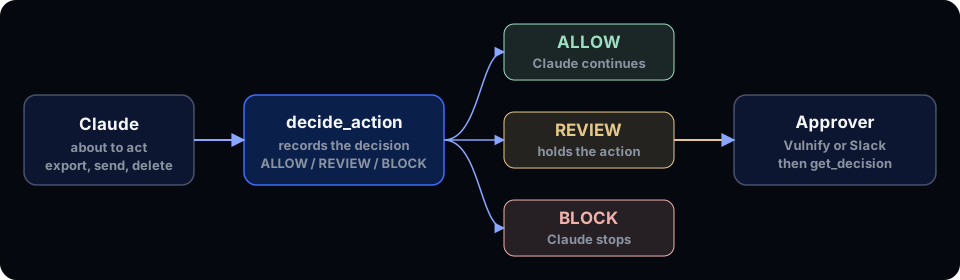
Two tools matter for a live decision:
decide_actionrecords a real decision for the action Claude is about to take (POST /v1/events). It writes a security event and an audit entry, and it can open a review.get_decisionreads that decision again (GET /v1/events/{id}). WithwaitMsit polls aREVIEWuntil it becomesALLOWorBLOCK, for up to 30 seconds per call.
finalDecision is the result that counts. ALLOW means proceed. REVIEW means hold the action until a person decides. BLOCK means skip it. The stored decision stays REVIEW; only finalDecision changes when someone answers.
The server tells Claude when to call decide_action. That is guidance for the model. Vulnify does not intercept Claude's other connectors by itself. To enforce the decision in the tool path, use the Claude Code hook or the MCP gateway (beta).
Add the policy Claude will hit
Claude describes each action with an agent name (for example claude), the action, the resource, the destination, and the record count. Register that agent and the resources Claude works with in the app under the names Claude will use. An unknown agent or resource comes back as a tool error, and a tool error is not an ALLOW, so Claude holds the action. Give the agent permission for the actions it may take on each resource.
This rule sends any export that leaves the company to a person:
apiVersion: vulnify.io/v1
kind: Policy
metadata:
  name: review-external-exports
spec:
  description: A person approves any export that leaves the company
  enabled: true
  action: EXPORT
  resource: ANY
  condition:
    destination: EXTERNAL
  decision: REVIEW
  mode: ENFORCE
  approverRoles:
    - OWNER
    - ADMIN
Apply it with the CLI or create the same rule under Policies in the app. A REVIEW policy can tighten the risk engine, never loosen it. Exporting data classified Sensitive or Customer PII to an outside destination scores CRITICAL and is blocked outright, even with this policy in place.
What a review looks like from Claude
Ask Claude for something the rule covers, for example an export of 800 rows emailed to an outside address. Before it sends anything, Claude calls decide_action:
{
  "agent": "claude",
  "action": "EXPORT_DATA",
  "resource": "Customer Database",
  "destination": "EXTERNAL_EMAIL",
  "recordsAffected": 800
}
On a test workspace that came back as REVIEW, HIGH, score 65, with reasons Export operation, External destination, Large data volume (800 records), and Policy matched: review-external-exports. Claude holds the export and tells you it is waiting for approval in Vulnify.
An approver resolves the review in the app, from the Slack app with Approve and Deny, or from the review email when review emails are on. A user whose role is in the policy's approverRoles (here Owner or Admin) approves or denies. Approving a HIGH or CRITICAL review asks for a current authenticator code when the approver has MFA on.
Claude then calls get_decision with the event id and waitMs up to 30000. After approval, finalDecision is ALLOW and Claude continues. After a denial or an expired review, it is BLOCK and Claude does not send the export. If the wait ends first, waitTimedOut is true and finalDecision is still REVIEW; ask Claude to check again later.
Every decision, including the blocked ones, is appended to the audit log. You can download that trail as JSON or CSV with a SHA-256 checksum, or as SIEM export in JSON or CEF lines.
Try the same calls from code
To see the flow without a chat, call the hosted server with a TEST key (sandbox events stay out of the main dashboards):
npm install @modelcontextprotocol/sdk
import { randomUUID } from "node:crypto";
import { Client } from "@modelcontextprotocol/sdk/client/index.js";
import { StreamableHTTPClientTransport } from "@modelcontextprotocol/sdk/client/streamableHttp.js";

const apiKey = process.env.VULNIFY_API_KEY;
if (!apiKey) throw new Error("Set VULNIFY_API_KEY");

const client = new Client({ name: "vulnify-guide", version: "1.0.0" });
await client.connect(
  new StreamableHTTPClientTransport(new URL("https://mcp.vulnify.io/mcp"), {
    requestInit: { headers: { Authorization: `Bearer ${apiKey}` } },
  }),
);

async function call(name, args) {
  const result = await client.callTool({ name, arguments: args });
  if (result.isError) throw new Error(`${name} failed`);
  return result.structuredContent;
}

let decision = await call("decide_action", {
  agent: "claude",
  action: "EXPORT_DATA",
  resource: "Customer Database",
  destination: "EXTERNAL_EMAIL",
  recordsAffected: 800,
  idempotencyKey: randomUUID(),
});

for (let i = 0; decision.finalDecision === "REVIEW" && i < 10; i++) {
  decision = await call("get_decision", { id: decision.id, waitMs: 30_000 });
}

console.log(
  decision.finalDecision === "ALLOW"
    ? "export runs"
    : `export does not run (${decision.finalDecision})`,
);
await client.close();
Run it with VULNIFY_API_KEY set, then approve the review in the app while it waits. idempotencyKey makes a retry return the same event instead of recording a second one. An API-key session lists all seven tools on the server; OAuth in Claude offers the five that match the consent scopes.
Before you start
- Connect Vulnify from Claude's connector directory, or add
https://mcp.vulnify.io/mcpas a custom connector. - Register the agent and resources Claude will name in the app, and grant the actions it needs.
- Apply at least one
REVIEWorBLOCKpolicy for the actions you care about. - Have an Owner or Admin ready to approve in Vulnify or in Slack.
The full walkthrough is in the Claude connector approval guide. For authorizing MCP tool calls in general, see MCP security: authorize the tool call, not just the connection. For the review design that keeps the queue small, see Human-in-the-loop without approval fatigue.
Vulnify decides every sensitive agent action before it runs: ALLOW, REVIEW or BLOCK, with the reasons.
Try it free