
Human-in-the-loop without approval fatigue
The first instinct with an AI agent that can touch real systems is to put a person in front of everything. Every tool call pops up a dialog, someone clicks approve, the agent continues.
It feels safe for about a week. Then the person approving has seen two hundred harmless reads in a row, and the two hundred and first request, the one that emails a customer list to an outside address, gets the same reflexive click. That's approval fatigue: the human is still in the loop, but no longer paying attention.
This post is about the opposite design. Most actions run without anyone looking. Clearly bad ones never run. A person sees only the few in between, with enough context to decide in seconds.
Why "approve everything" fails
People are good at judging a single unusual request. They are bad at judging a stream of identical ones. When nearly every prompt turns out fine, approving becomes a habit rather than a decision. This is the familiar automation-bias problem: the more often the system is right, the less closely people check it.
Three things make it worse with agents:
- Volume. An agent can make dozens of tool calls to finish one task. A human gate on each one turns a 30-second task into a queue.
- No context. A bare "Allow
export_tickets?" prompt doesn't say how many rows, where they go, or why this one is different from the last one. - The same person, every time. If whoever started the agent is also the one approving its actions, the review is really a speed bump.
So the goal isn't more approvals. It's fewer, better ones.
Sort actions into three buckets
Look at what your agent actually does and most of it falls into three groups:
- Routine, low risk. Reading one record, updating a ticket, writing to an internal system. These should run with no human involved.
- Clearly unacceptable. Bulk exports of customer data to a personal mailbox, deleting a production table. Nobody should be asked about these; they should just not happen.
- The risky middle. An export of a few hundred records to a partner, a write to a financial system, an action outside business hours. Sometimes legitimate, sometimes not. This is the only group a person should see.
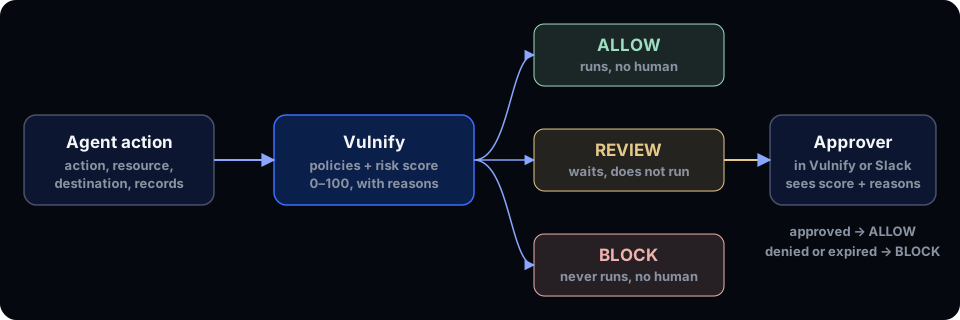
That's what Vulnify does at runtime. Before a sensitive action runs, your code describes it (agent, action, resource, destination, record count) and Vulnify answers ALLOW, REVIEW or BLOCK. Each answer comes with a riskScore from 0 to 100, a riskLevel (LOW, MEDIUM, HIGH or CRITICAL) and the reasons behind it. The action runs only when finalDecision is ALLOW.
What the approver actually sees
A review is only as good as the context it carries. Here's a real one from a test run: an EXPORT_DATA of 800 records to an EXTERNAL_EMAIL destination.
decision: REVIEW
riskLevel: HIGH
riskScore: 65
reasons: Export operation; External destination; Large data volume (800 records)
The approver doesn't have to reconstruct what the agent was doing. They see that data is leaving, that it's going outside the company, and how much of it. That's a decision you can make in a few seconds, and because these requests are rare, you actually read them.
Write the middle down as policy
The risk engine scores every action on its own. Policies let you say where your lines are. A policy matches on the action, the resource type, the destination, a record range, a minimum risk score, whether the resource holds sensitive data, outside business hours, or specific agents, and then forces REVIEW or BLOCK.
apiVersion: vulnify.io/v1
kind: Policy
metadata:
  name: block-bulk-customer-export
spec:
  description: Block exports of more than 1000 customer records
  enabled: true
  action: EXPORT
  resource: CUSTOMER_PII
  condition:
    minRecords: 1001
  decision: BLOCK
  mode: ENFORCE
---
apiVersion: vulnify.io/v1
kind: Policy
metadata:
  name: review-external-exports
spec:
  description: A person approves any export that leaves the company
  enabled: true
  action: EXPORT
  resource: ANY
  condition:
    destination: EXTERNAL
  decision: REVIEW
  mode: ENFORCE
  approverRoles:
    - OWNER
    - ADMIN
Two properties keep this from drifting back into fatigue:
- Reviews tighten, they don't loosen. A
REVIEWpolicy can't make the engine more permissive. If the engine scores an actionCRITICAL, the result isBLOCKeven when aREVIEWpolicy matched, and the reasons say so. You never end up asking a person to approve something that should simply have been stopped. - The rules live outside the agent. They're edited in the app or kept as YAML and applied with the CLI. When the review queue gets noisy, you adjust a threshold, not the agent's code. The app can also replay recent history against a draft rule to show how many events would change before you save it.
If one rule produces most of your reviews and the approver approves nearly all of them, that's the signal: the threshold is too low, or that action belongs in the ALLOW bucket.
Make the review itself trustworthy
Fewer reviews only help if each one means something. In Vulnify:
- Someone else approves. The approval happens on the Vulnify server, by someone other than the requester, with a role the policy allows (
approverRoles: owner, admin or member). The process that asked can't approve its own request. - High stakes ask for more. Approving a
HIGHorCRITICALreview asks for a current authenticator code when the approver has MFA on. - Approve where people already are. With the Slack app connected, review alerts carry Approve and Deny buttons, so the approver answers in Vulnify or in Slack. Owners and admins can also get review emails with Approve and Deny buttons that lead to a confirmation page in the app.
- Silence is a no. A pending review expires after the organization's review window. A denied or expired review becomes
BLOCK, so an unanswered request never turns into a quiet yes.
Every decision goes into the audit trail, along with the reviewer's answer.
What the agent does while it waits
You choose. By default the check doesn't wait: on REVIEW, Python's guard() raises VulnifyBlockedError (the Node SDK throws the same error), the action doesn't run, and the agent can tell the user that a person needs to approve and move on. If the agent should pause instead, pass wait and the SDK polls for the answer, running the action only if it's approved:
vulnify.guard(
    lambda: export_tickets(email, rows),
    wait={"timeout": 120},  # on REVIEW, wait up to 2 minutes for a person
    agent="SupportBot",
    action="EXPORT_DATA",
    resource="Support Tickets",
    destination="EXTERNAL_EMAIL",
    records_affected=rows,
)
TIMEOUT (your client gave up) and EXPIRED (the server's review window elapsed) are different, but in both cases the export doesn't run. For the same pattern inside a LangGraph tool node, see Vulnify for LangChain and LangGraph.
Start by watching, not blocking
You don't have to guess the thresholds up front. In monitor mode, Vulnify records what would have been reviewed or blocked (evaluatedDecision) and answers ALLOW, so nothing stops. A week of real traffic tells you how big your risky middle actually is, and whether a person could keep up with it, before anyone gets a single approval request.
A short checklist
- List the actions your agent can take and put each in allow, review or block.
- Block the clearly bad ones outright. Don't route them to a person.
- Send only the middle to review, and make sure each request shows the score and the reasons.
- Require an approver other than the requester, and MFA for high-risk approvals.
- Let unanswered reviews expire to
BLOCK. - Watch the queue. If approvals are almost always yes, move the line.
The details of review states, waiting and approval channels are in the Reviews docs and Slack docs. For the data side of the same problem, see how to stop an AI agent from exfiltrating customer data.
Vulnify decides every sensitive agent action before it runs: ALLOW, REVIEW or BLOCK, with the reasons.
Try it free